
7 posts tagged with "Frontend"

Frontend tag description

View all tags

Lesson Learned Building an AI Chatbot

· 2 min read

A month ago, while building a resume coach AI chatbot using Lambda functions and deploying them on Vercel(a leading cloud platform for frontend developers), I repeatedly encountered timeout errors in the Vercel logs during testing. As I debugged the issue for sometime, I discovered that I was using response.json() instead of streaming the response, which was causing the timeout ⌛️errors on Vercel. Once I updated the Lambda functions to use streams, it started to work without issues.

💡 I had built the chatbot’s UI using React.

resume-coach

Why do we need to use streams in Lambda?

Streams are ideal for AI chatbots or any conversation based applications because they give good user experience. With streaming, users don’t have to wait for the entire response but they can receive the output incrementally, a better interactive experience for the user 🙂.

Based on my personal experience building APIs, I would suggest streaming for texts and json for any CRUD operations or business logic implementation.

Lambda /serverless function:

    // Request streamed response from AI model
const stream = AI.generateStream(userPrompt)

res.setHeader("Content-Type", "text/plain; charset=utf-8");
res.setHeader("Cache-Control", "no-cache");

// Return chunks immediately to frontend
for await (const chunk of stream) {
const text = chunk.text;
if (text) {
res.write(text);
}
}

res.end();

Frontend(React)

const res = await fetch("api/chat");

const reader = res.body.getReader();
const decoder = new TextDecoder();

let fullText = "";

while (true) {
const { value, done } = await reader.read();
if (done) break;

const chunk = decoder.decode(value);
fullText += chunk;
}

if (!res.ok) {
throw new Error(`Failed to get response: ${res.status}`);
}

💡 Vercel allows us to send data to the client(frontend) in chunks rather than waiting for the entire response to be generated.

What are you building using AI?

Have you faced any issue building using AI and how did you solve it?

Happy learning 🎉

If you have any queries or suggestions, please reach out to yoe.johnson@gmail.com

#ai #chatbot #resumebuilder #serverless #vercel #lessonlearned #frontend #developer #learning #node #react #lambda #ui #gemini #chat
Frontend Development Starter Guide 🚀

· One min read

Welcome to makeadifference blog 👋🏽 If you're curious about becoming a Frontend Developer (and eventually a Full‑Stack Developer), this starter blog is designed just for you. Think of this as a mini‑course in blog form—covering the what, why, and how, with simple hands‑on exercises you can practice right away.

No prior experience required—just curiosity and consistency.

What Is Frontend Development?

· One min read

What Is Frontend Development?

Frontend development is all about what users see and interact with in a web application. This includes:

  • Buttons, forms, layouts
  • Colors, fonts, animations
  • Page navigation and interactions

Core Frontend Technologies

Every frontend developer starts with these three pillars:

  1. HTML – Structure (the skeleton)
  2. CSS – Styling (the look & feel)
  3. JavaScript – Behavior (logic & interaction)

Once you master these, frameworks like React and Vue become much easier to learn.

HTML Basics

· 2 min read

Your First Step: HTML Basics

HTML defines the structure of a webpage.

Example

<!DOCTYPE html>
<html>
<head>
<title>My First Page</title>
</head>
<body>
<h1>Hello Frontend!</h1>
<p>This is my first webpage.</p>
</body>
</html>

🧪 Exercise

  1. Create a file called index.html

  2. Add:

    • Your name as a heading
    • A short paragraph about why you want to learn frontend
  3. Open the file in your browser

🧪 Exercise - Lists

Create a list of your favorite fruits and tasks:

<h2>My Favorite Fruits</h2>
<ul>
<li>Apple</li>
<li>Banana</li>
<li>Mango</li>
</ul>

<h2>Things to Do Today</h2>
<ol>
<li>Wake up</li>
<li>Eat breakfast</li>
<li>Code a mini project</li>
</ol>
<h2>My Favorite Website</h2>
<a href="https://www.google.com" target="_blank">Visit Google</a>

<h2>My Favorite Pet</h2>
<img src="https://placekitten.com/200/200" alt="Cute Kitten">

🧪 Exercise - Forms & Input

<h2>Sign Up Form</h2>
<form>
Name: <input type="text" placeholder="Enter your name"><br><br>
Email: <input type="email" placeholder="Enter your email"><br><br>
<button type="submit">Submit</button>
</form>

✅ Goal: Understand how structure appears in the browser


If you want to learn other concepts in HTML, below is the link from MDN.

MDN HTML Tutorials — structured from beginner basics to advanced topics, with examples and explanations. HTML guide (MDN) https://developer.mozilla.org/en-US/docs/Web/HTML

CSS Basics

· One min read

CSS is what makes websites colorful, big, small, pretty, and fun.
HTML builds the house 🏠 — CSS paints and decorates it 🎨.

Example

body {
font-family: Arial, sans-serif;
background-color: #f5f5f5;
}

h1 {
color: #2c3e50;
}

🧪 Exercise

  1. Create style.css

  2. Change:

    • Background color
    • Font size
    • Text color
  3. Link CSS to HTML

<link rel="stylesheet" href="style.css" />

✅ Goal: Learn separation of structure and style

If you want to learn other concepts in CSS, below is the link from MDN.

MDN CSS Tutorials — structured from beginner basics to advanced topics, with examples and explanations. CSS Tutorials (MDN) https://developer.mozilla.org/en-US/docs/Web/CSS/Tutorials

Box Example

Live Editor
<>
  <div
    style={{
      backgroundColor: "orange",
      padding: "20px",
      border: "2px solid black",
      width: "200px",
      textAlign: "center"
    }}
  >
    I am a box
  </div>
</>
Result
Loading...

Button Hover Example

Live Editor
<>
  <button
    style={{
      backgroundColor: "green",
      color: "white",
      padding: "10px 20px",
      border: "none",
      cursor: "pointer"
    }}
    onMouseOver={e => e.target.style.backgroundColor = "orange"}
    onMouseOut={e => e.target.style.backgroundColor = "green"}
  >
    Hover Me
  </button>
</>
Result
Loading...

JavaScript: Bringing Pages to Life

· 2 min read

JavaScript: Bringing Pages to Life

JavaScript adds logic and interaction.

Example

<button onclick="sayHello()">Click Me</button>

<script>
function sayHello() {
alert('Welcome to Frontend Development!');
}
</script>

🧪 Exercise

  1. Create a button

  2. On click:

    • Change text on the page
    • OR show today’s date

✅ Goal: Understand events and functions

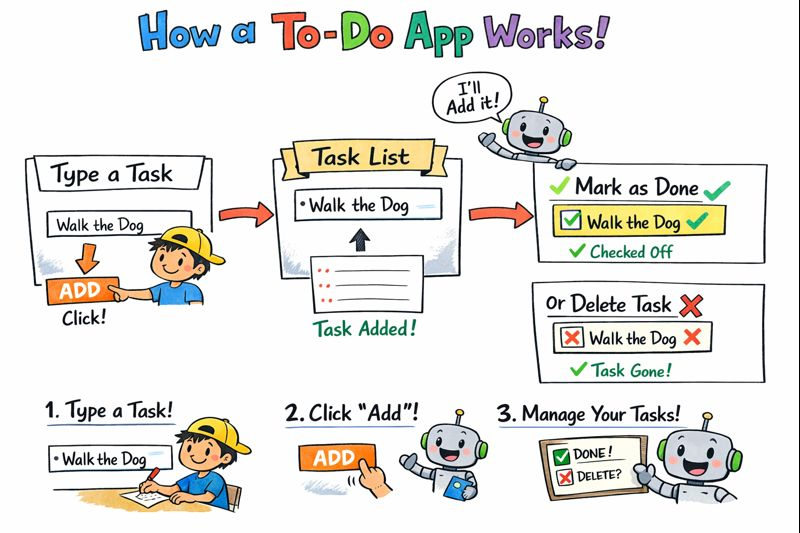
📝 Task

Build a simple To-Do list using JavaScript.

The application should allow users to manage daily tasks using a basic web interface.

alt text


✅ Requirements

  • An input field to type a task
  • A button to add the task
  • A list to display all added tasks

🧪 Exercises

Exercise 1: Add a Task

  • Allow the user to enter a task
  • Add the task to the list when the button is clicked

Exercise 2: Prevent Empty Tasks

  • Do not allow empty tasks to be added
  • Show a message if the input is empty

Exercise 3: Remove a Task

  • Each task should have a delete option
  • Clicking delete should remove the task from the list

Exercise 4: Mark Task as Completed

  • Clicking a task should mark it as completed
  • Completed tasks should look visually different

Exercise 5: Add Task Using Keyboard

  • Allow the user to add a task by pressing the Enter key

Exercise 6: Show Task Count

  • Display the total number of tasks
  • Update the count when tasks are added or removed

🎯 Goal

Complete this exercise using plain JavaScript (no frameworks).

If you can finish all tasks, you are ready to:

  • Build a React To-Do app
  • Manage state in frontend frameworks
  • Handle real user interactions

If you want to learn other concepts in JavaScript, below is the link from MDN.

MDN JavaScript Tutorials — structured from beginner basics to advanced topics, with examples and explanations. JavaScript guide (MDN) https://developer.mozilla.org/en-US/docs/Web/JavaScript

4-Week Starter Course Plan

· 2 min read

What’s Next?

Below is a 4-Week Starter Course Plan you can follow alongside this blog.


4-Week Frontend Starter Course Plan 🗓️

Week 1: Web Foundations

Focus: HTML, CSS, basics of the web

Learn:

  • How the internet works (browser, server, request/response)
  • HTML tags, forms, images, links
  • CSS basics: colors, fonts, spacing

Practice Projects:

  • Personal profile page
  • Simple contact form

Challenge:

Build a one-page website about yourself using only HTML & CSS.


Week 2: JavaScript Essentials

Focus: Core JavaScript for frontend

Learn:

  • Variables, functions, loops
  • DOM manipulation
  • Events (click, input, submit)

Practice Projects:

  • Counter app
  • Show/hide password toggle

Challenge:

Create a small app that updates content dynamically without refreshing the page.


Week 3: Modern Frontend (React or Vue)

Focus: Component-based development

Learn:

  • Components & props
  • State management
  • Conditional rendering

Practice Projects:

  • Todo list
  • Simple dashboard UI

Challenge:

Convert a static page into reusable components.


Week 4: Backend Basics with Node.js

Focus: Full-stack fundamentals

Learn:

  • Node.js & Express
  • REST APIs
  • Connecting frontend to backend

Practice Projects:

  • Simple API
  • Fetch data from backend

Challenge:

Build a frontend that consumes your own backend API.


Bonus: Career Readiness

  • Git & GitHub basics
  • Portfolio building
  • Resume & interview prep

Final Words 🌱

You don’t need to know everything to start— you just need to start and keep going.

Consistency beats talent in software development.

Happy coding! 🎉

If you have any queries or suggestions, please reach out to yoe.johnson@gmail.com