Frontend Development Starter Guide 🚀

· One min read

Welcome! If you're curious about becoming a Frontend Developer (and eventually a Full‑Stack Developer), this starter blog is designed just for you. Think of this as a mini‑course in blog form—covering the what, why, and how, with simple hands‑on exercises you can practice right away.

No prior experience required—just curiosity and consistency.

4-Week Starter Course Plan

· 2 min read

What’s Next?​

Below is a 4-Week Starter Course Plan you can follow alongside this blog.


4-Week Frontend Starter Course Plan 🗓️​

Week 1: Web Foundations​

Focus: HTML, CSS, basics of the web

Learn:

  • How the internet works (browser, server, request/response)
  • HTML tags, forms, images, links
  • CSS basics: colors, fonts, spacing

Practice Projects:

  • Personal profile page
  • Simple contact form

Challenge:

Build a one-page website about yourself using only HTML & CSS.


Week 2: JavaScript Essentials​

Focus: Core JavaScript for frontend

Learn:

  • Variables, functions, loops
  • DOM manipulation
  • Events (click, input, submit)

Practice Projects:

  • Counter app
  • Show/hide password toggle

Challenge:

Create a small app that updates content dynamically without refreshing the page.


Week 3: Modern Frontend (React or Vue)​

Focus: Component-based development

Learn:

  • Components & props
  • State management
  • Conditional rendering

Practice Projects:

  • Todo list
  • Simple dashboard UI

Challenge:

Convert a static page into reusable components.


Week 4: Backend Basics with Node.js​

Focus: Full-stack fundamentals

Learn:

  • Node.js & Express
  • REST APIs
  • Connecting frontend to backend

Practice Projects:

  • Simple API
  • Fetch data from backend

Challenge:

Build a frontend that consumes your own backend API.


Bonus: Career Readiness​

  • Git & GitHub basics
  • Portfolio building
  • Resume & interview prep

Final Words 🌱​

You don’t need to know everything to start— you just need to start and keep going.

Consistency beats talent in software development.

Happy coding! 🎉

HTML Basics

· One min read

Your First Step: HTML Basics​

HTML defines the structure of a webpage.

Example​

<!DOCTYPE html>
<html>
<head>
<title>My First Page</title>
</head>
<body>
<h1>Hello Frontend!</h1>
<p>This is my first webpage.</p>
</body>
</html>

🧪 Exercise​

  1. Create a file called index.html

  2. Add:

    • Your name as a heading
    • A short paragraph about why you want to learn frontend
  3. Open the file in your browser

âś… Goal: Understand how structure appears in the browser


CSS Basics

· One min read

Styling with CSS​

CSS makes your website beautiful and readable.

Example​

body {
font-family: Arial, sans-serif;
background-color: #f5f5f5;
}

h1 {
color: #2c3e50;
}

🧪 Exercise​

  1. Create style.css

  2. Change:

    • Background color
    • Font size
    • Text color
  3. Link CSS to HTML

<link rel="stylesheet" href="style.css" />

âś… Goal: Learn separation of structure and style


JavaScript: Bringing Pages to Life

· 2 min read

JavaScript: Bringing Pages to Life​

JavaScript adds logic and interaction.

Example​

<button onclick="sayHello()">Click Me</button>

<script>
function sayHello() {
alert('Welcome to Frontend Development!');
}
</script>

🧪 Exercise​

  1. Create a button

  2. On click:

    • Change text on the page
    • OR show today’s date

âś… Goal: Understand events and functions

📝 Task​

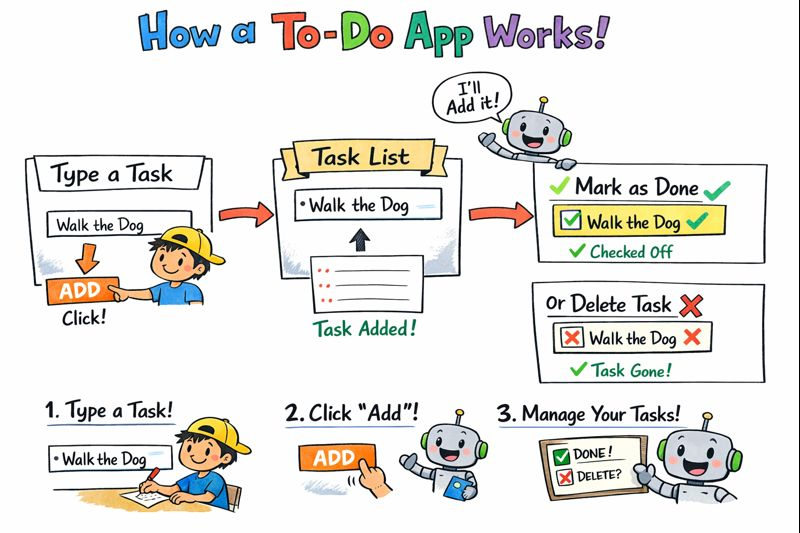
Build a simple To-Do list using JavaScript.

The application should allow users to manage daily tasks using a basic web interface.


✅ Requirements​

  • An input field to type a task
  • A button to add the task
  • A list to display all added tasks

🧪 Exercises​

Exercise 1: Add a Task​

  • Allow the user to enter a task
  • Add the task to the list when the button is clicked

Exercise 2: Prevent Empty Tasks​

  • Do not allow empty tasks to be added
  • Show a message if the input is empty

Exercise 3: Remove a Task​

  • Each task should have a delete option
  • Clicking delete should remove the task from the list

Exercise 4: Mark Task as Completed​

  • Clicking a task should mark it as completed
  • Completed tasks should look visually different

Exercise 5: Add Task Using Keyboard​

  • Allow the user to add a task by pressing the Enter key

Exercise 6: Show Task Count​

  • Display the total number of tasks
  • Update the count when tasks are added or removed

🎯 Goal​

Complete this exercise using plain JavaScript (no frameworks).

If you can finish all tasks, you are ready to:

  • Build a React To-Do app
  • Manage state in frontend frameworks
  • Handle real user interactions

What Is Frontend Development?

· One min read

What Is Frontend Development?​

Frontend development is all about what users see and interact with in a web application. This includes:

  • Buttons, forms, layouts
  • Colors, fonts, animations
  • Page navigation and interactions

Core Frontend Technologies​

Every frontend developer starts with these three pillars:

  1. HTML – Structure (the skeleton)
  2. CSS – Styling (the look & feel)
  3. JavaScript – Behavior (logic & interaction)

Once you master these, frameworks like React and Vue become much easier to learn.